Skip to content

Demo Autotests Project

This is a demo autotest project implemented with pomcorn package for PyPI web site. To start tests in this project you need to prepare a python virtual environment and install according driver for Chrome browser.

You can get a demo project from package repository.

Setup

Environment

The simplest way to configure a proper Python version and virtual environment is using uv.

Install dependencies and activate your virtualenv

uv sync --only-group demo
source .venv/bin/activate

Install Chrome webdriver.

Running Autotests

To run tests, use invoke command pytest:

inv pytest.run

About the project

This project is a mini autotesting system for the PyPI website. It implements the basic structure of pages and tests according to Page Object Model pattern.

The project structure looks like this (__init__.py files were skipped to simplify the structure):

 demo/
├── pages/
│   ├── base/
│      ├── base_components.py
│      └── base_page.py
│   ├── common/
│      ├── navigation_bar.py
│      └── search.py
│   ├── search_page/
│      ├── components/
│         ├── package_list.py
│         └── package.py
│      └── search_page.py
│   ├── help_page.py
│   ├── index_page.py
│   └── package_details_page.py
├── tests
│   ├── test_logo.py
│   └── test_search.py
└── conftest.py

Pages

This folder contains the page and component classes required to represent PyPI web pages. These classes contain web page interaction logic to make tests free of that implementation.

Base Folder

Basic classes for PyPI pages and components are implemented here.

Base Components
Base Page

Note

The check_page_is_loaded method and the APP_ROOT attribute require special attention here.

PyPIPage

Bases: Page

Base representation of the page for PyPI.

This is the base page for all following pages, so here we have to implement only properties and methods common to all pages of application.

Source code in demo/pages/base/base_page.py
15
16
17
18
19
20
21
22
23
24
25
26
27
28
29
30
31
32
33
34
35
36
37
38
39
40
41
42
43
44
45
46
47
48
49
50
51
52
53
54
55
56
57
58
59
60
61
62
63
64
65
66
67
68
69
70
71
72
73
74
75
76
77
78
79
80
81
82
83
84
85
86
87
88
89
90
91
92
93
94
95
96
class PyPIPage(Page):
    """Base representation of the page for PyPI.

    This is the base page for all following pages, so here we have to implement
    only properties and methods common to all pages of application.

    """

    # Be sure to redefine this attribute:
    # specify the base domain of your app here.
    APP_ROOT = "https://pypi.org/"

    def __init__(
        self,
        webdriver: WebDriver,
        *,
        app_root: str | None = None,
        # Next arguments have default values, so you can delete/specify them.
        wait_timeout: float = 10,
        poll_frequency: float = 0.01,
    ):
        super().__init__(
            webdriver,
            app_root=app_root,
            wait_timeout=wait_timeout,
            poll_frequency=poll_frequency,
        )

        # The Logo will be on all the pages of the application so we initialize
        # it in base page class.
        self.logo = self.init_element(
            # The ``locator=`` keyword is optional here, but we recommend using
            # it to be consistent with the method of the same name in
            # ``Component``. Same with ``init_elements``.
            locator=locators.ClassLocator("site-header__logo"),
        )

    # We recommend adding components to the page as properties, because it
    # helps us to run `waits_until_visible` method every time this component is
    # accessed. But if you need to perform some actions before manipulating
    # this component (e.g. clicking, hovering, etc.), it's better to create
    # opening methods on page (like `open_navbar`).
    @property
    def navbar(self) -> Navbar:
        """Get a component for working with the page navigation panel."""
        from demo.pages.common import Navbar

        return Navbar(self)

    # Some pages can be slow to load and cause problems checking for unloaded
    # items. To be sure the page is loaded, this method should return the
    # result of checking for the slowest parts of the page.
    def check_page_is_loaded(self) -> bool:
        """Return the result of checking that the page is loaded.

        Check that `main` tag is displayed.

        """
        # Be careful with the elements you use to check page load. If you only
        # use them to check loading, it's better to initiate them directly in
        # this method. Otherwise, it is better to define them as page
        # properties or initiate them in the `__init__` method above the
        # `super().__init__` call. This is necessary because the
        # `wait_until_loaded` method will be called in `super().__init__`, and
        # it depends on `check_page_is_loaded`.
        return self.init_element(
            locator=locators.TagNameLocator("main"),
        ).is_displayed

    def wait_until_loaded(self, timeout: float | None = None) -> None:
        super().wait_until_loaded(timeout)
        # Wait for notification bar became visible: this bar may cause
        # click interruption but it doesn't always appear, so it's
        # inconvenient to wait for it to appear using the locator
        sleep(0.5)

    def click_on_logo(self) -> IndexPage:
        """Click on the logo and redirect to `IndexPage`."""
        from demo.pages import IndexPage

        self.logo.click()
        return IndexPage(self.webdriver)

navbar property

Get a component for working with the page navigation panel.

check_page_is_loaded()

Return the result of checking that the page is loaded.

Check that main tag is displayed.

Source code in demo/pages/base/base_page.py
67
68
69
70
71
72
73
74
75
76
77
78
79
80
81
82
def check_page_is_loaded(self) -> bool:
    """Return the result of checking that the page is loaded.

    Check that `main` tag is displayed.

    """
    # Be careful with the elements you use to check page load. If you only
    # use them to check loading, it's better to initiate them directly in
    # this method. Otherwise, it is better to define them as page
    # properties or initiate them in the `__init__` method above the
    # `super().__init__` call. This is necessary because the
    # `wait_until_loaded` method will be called in `super().__init__`, and
    # it depends on `check_page_is_loaded`.
    return self.init_element(
        locator=locators.TagNameLocator("main"),
    ).is_displayed

Click on the logo and redirect to IndexPage.

Source code in demo/pages/base/base_page.py
91
92
93
94
95
96
def click_on_logo(self) -> IndexPage:
    """Click on the logo and redirect to `IndexPage`."""
    from demo.pages import IndexPage

    self.logo.click()
    return IndexPage(self.webdriver)

Common

This folder contains components common to multiple pages.

This class represents navigation bar on the top side of all PyPI pages.

PyPI navigation bar

Navbar

Bases: PyPIComponent

Component representing navigation bar in the top of web application.

Source code in demo/pages/common/navigation_bar.py
16
17
18
19
20
21
22
23
24
25
26
27
28
29
30
31
32
33
34
35
class Navbar(PyPIComponent):
    """Component representing navigation bar in the top of web application."""

    base_locator = locators.ClassLocator(
        class_name="horizontal-menu",
        # We specify `container` here because the page has several `nav`
        # tags and several elements with a similar class name.
        container="nav",
    )

    help_button = Element(
        locator=locators.ElementWithTextLocator(text="Help", element="a"),
    )

    def open_help(self) -> HelpPage:
        """Click on `Help` button and redirect to HelpPage."""
        from demo.pages.help_page import HelpPage

        self.help_button.click()
        return HelpPage(self.webdriver)

open_help()

Click on Help button and redirect to HelpPage.

Source code in demo/pages/common/navigation_bar.py
30
31
32
33
34
35
def open_help(self) -> HelpPage:
    """Click on `Help` button and redirect to HelpPage."""
    from demo.pages.help_page import HelpPage

    self.help_button.click()
    return HelpPage(self.webdriver)
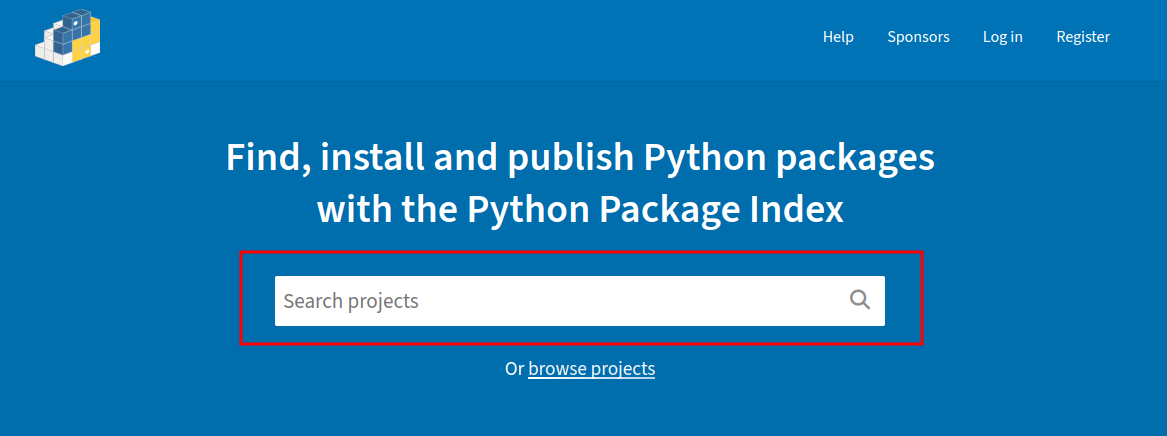
Search component

This class represents a search field that can be placed on multiple pages.

Search field examples
Index page
Search field on PyPI index page
Navbar
Search field on PyPI navigation bar

Search

Bases: PyPIComponent

Component representing the search input field.

Source code in demo/pages/common/search.py
14
15
16
17
18
19
20
21
22
23
24
25
26
27
28
29
30
31
class Search(PyPIComponent):
    """Component representing the search input field."""

    # If you are not going to write anything in ``__init__`` and only want
    # to set up ``base_locator``, you can specify it as a class attribute
    base_locator = locators.IdLocator("search")

    def find(self, text: str) -> SearchPage:
        """Paste the text into the search field and send `Enter` key.

        Redirect to `SearchPage` and return its instance.

        """
        from demo.pages.search_page import SearchPage

        self.body.fill(text)
        self.body.send_keys(Keys.ENTER)
        return SearchPage(self.webdriver)

find(text)

Paste the text into the search field and send Enter key.

Redirect to SearchPage and return its instance.

Source code in demo/pages/common/search.py
21
22
23
24
25
26
27
28
29
30
31
def find(self, text: str) -> SearchPage:
    """Paste the text into the search field and send `Enter` key.

    Redirect to `SearchPage` and return its instance.

    """
    from demo.pages.search_page import SearchPage

    self.body.fill(text)
    self.body.send_keys(Keys.ENTER)
    return SearchPage(self.webdriver)

Search Page Folder

Search Page Components

Because a number of additional components needed to be created to implement the search page, a separate folder was created for this page. This is where the page itself and its dependent components are stored.

Package List

This class represents a list of found packages on the PyPI search page.
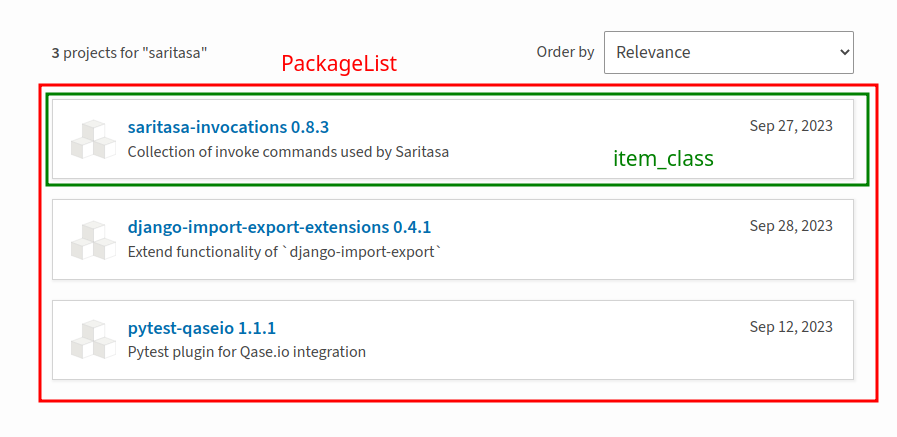
PyPI Package List

PackageList

Bases: ListComponent[Package, PyPIPage]

Represent the list of search results on SearchPage.

Source code in demo/pages/search_page/components/package_list.py
 7
 8
 9
10
11
12
13
14
15
16
17
18
19
20
21
22
23
24
25
26
class PackageList(ListComponent[Package, PyPIPage]):
    """Represent the list of search results on `SearchPage`."""

    # By default `ListComponent` have `item_class` attribute with stored first
    # Generic variable (Package in current case). This attribute is responsible
    # for the class that will be used for list items.

    base_locator = locators.PropertyLocator(
        prop="aria-label",
        value="Search results",
    )

    # Set up ``relative_item_locator`` or ``item_locator`` is required.
    # Use ``relative_item_locator`` - if you want locator nested within
    # ``base_locator``, ``item_locator`` - otherwise."
    # You also may override ``base_item_locator`` property.
    relative_item_locator = locators.ClassLocator(
        class_name="package-snippet",
        container="a",
    )
Package

This class represents one found package listed on the PyPI search page.
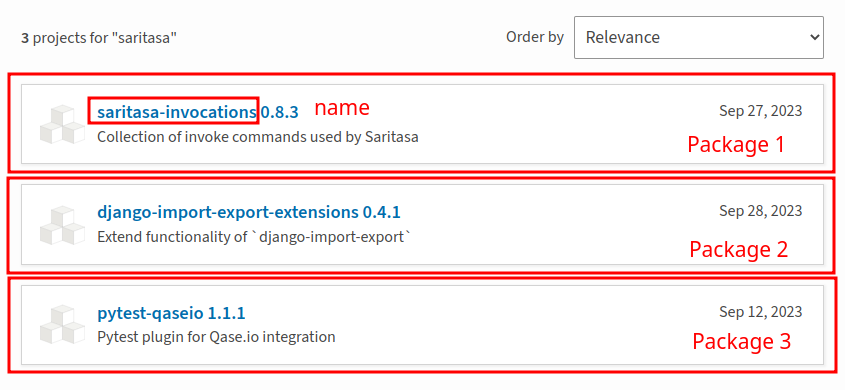
PyPI Package

Package

Bases: PyPIComponent

Represent the single search result (package) on SearchPage.

Source code in demo/pages/search_page/components/package.py
12
13
14
15
16
17
18
19
20
21
22
23
24
25
26
27
28
29
30
class Package(PyPIComponent):
    """Represent the single search result (package) on `SearchPage`."""

    @property
    def name(self) -> str:
        """Get the package name."""
        return self.init_element(
            relative_locator=locators.ClassLocator("package-snippet__name"),
        ).get_text()

    def open(self) -> PackageDetailsPage:
        """Click on the package and open its details page."""
        from demo.pages import PackageDetailsPage

        # The property `body` is available because the package is descendant of
        # `Component`. It allows us to interact with the body of the component
        # and we can check that the package is clickable.
        self.body.click()
        return PackageDetailsPage(self.webdriver)

name property

Get the package name.

open()

Click on the package and open its details page.

Source code in demo/pages/search_page/components/package.py
22
23
24
25
26
27
28
29
30
def open(self) -> PackageDetailsPage:
    """Click on the package and open its details page."""
    from demo.pages import PackageDetailsPage

    # The property `body` is available because the package is descendant of
    # `Component`. It allows us to interact with the body of the component
    # and we can check that the package is clickable.
    self.body.click()
    return PackageDetailsPage(self.webdriver)
Search Page

This class represents the PyPI search page.
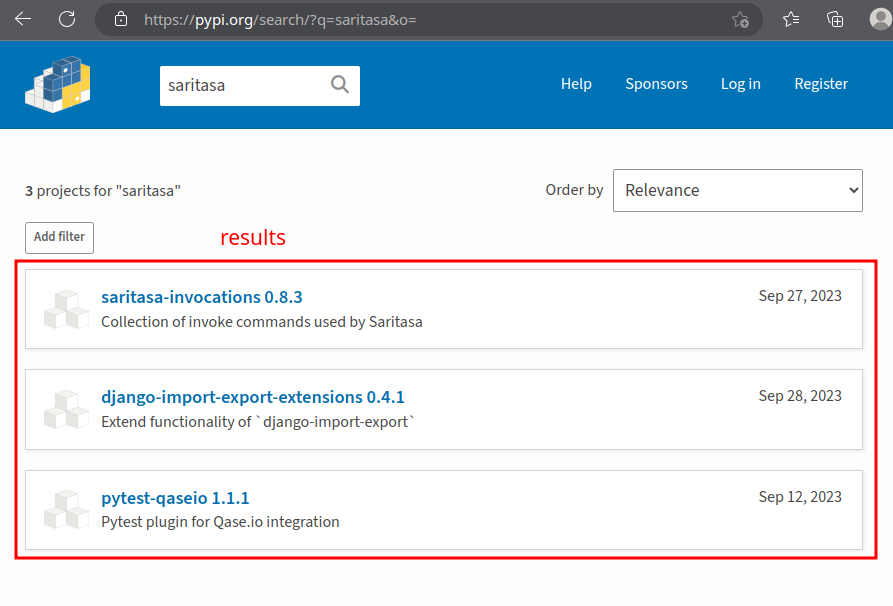
PyPI Search Page

SearchPage

Bases: PyPIPage

Representation of the page with search results.

Source code in demo/pages/search_page/search_page.py
10
11
12
13
14
15
16
17
18
19
20
21
22
23
24
25
26
27
28
class SearchPage(PyPIPage):
    """Representation of the page with search results."""

    @classmethod
    def open(
        cls,
        webdriver: WebDriver,
        *,
        app_root: str | None = None,
    ) -> SearchPage:
        """Open the search page."""
        # Open `IndexPage` and search for an empty query.
        # This will redirect us to the `SearchPage'.
        return IndexPage.open(webdriver).search.find("")

    @property
    def results(self) -> PackageList:
        """Get the component for work with the found packages."""
        return PackageList(self)

results property

Get the component for work with the found packages.

open(webdriver, *, app_root=None) classmethod

Open the search page.

Source code in demo/pages/search_page/search_page.py
13
14
15
16
17
18
19
20
21
22
23
@classmethod
def open(
    cls,
    webdriver: WebDriver,
    *,
    app_root: str | None = None,
) -> SearchPage:
    """Open the search page."""
    # Open `IndexPage` and search for an empty query.
    # This will redirect us to the `SearchPage'.
    return IndexPage.open(webdriver).search.find("")

Help Page

This class represents the PyPI help page. The title property is implemented here to show how you can use page properties to implement the check_page_is_loaded method.
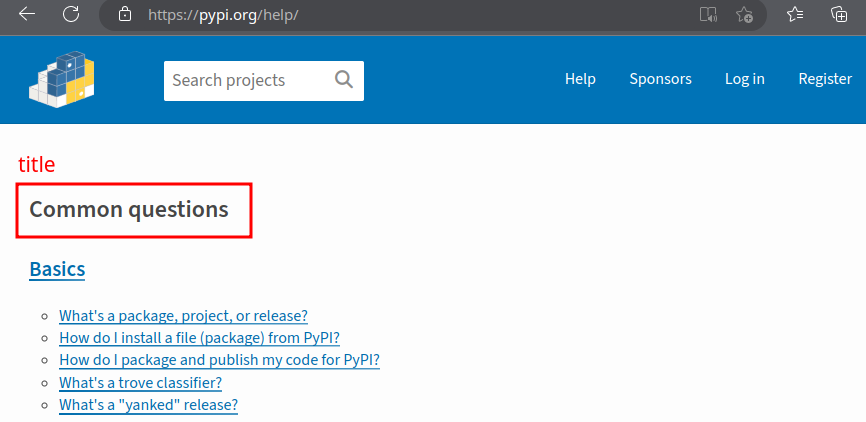
Help page title

HelpPage

Bases: PyPIPage

Represent the help page.

Source code in demo/pages/help_page.py
 9
10
11
12
13
14
15
16
17
18
19
20
21
22
23
24
25
26
27
28
29
30
31
32
33
34
35
36
37
class HelpPage(PyPIPage):
    """Represent the help page."""

    # Define element for title
    title_element = Element(locators.ClassLocator("page-title"))

    @classmethod
    def open(
        cls,
        webdriver: WebDriver,
        *,
        app_root: str | None = None,
    ) -> HelpPage:
        """Open the help page via the index page."""
        from demo.pages.index_page import IndexPage

        # Reusing already implemented methods of opening a page instead of
        # overriding `app_root` allows us to be independent from URL changes:
        # we move from one page to another, interacting with the page as the
        # user does.
        return IndexPage.open(webdriver, app_root=app_root).navbar.open_help()

    def check_page_is_loaded(self) -> bool:
        """Return the check result that the page is loaded.

        Return whether help page title element are displayed or not.

        """
        return self.title_element.is_displayed

check_page_is_loaded()

Return the check result that the page is loaded.

Return whether help page title element are displayed or not.

Source code in demo/pages/help_page.py
31
32
33
34
35
36
37
def check_page_is_loaded(self) -> bool:
    """Return the check result that the page is loaded.

    Return whether help page title element are displayed or not.

    """
    return self.title_element.is_displayed

open(webdriver, *, app_root=None) classmethod

Open the help page via the index page.

Source code in demo/pages/help_page.py
15
16
17
18
19
20
21
22
23
24
25
26
27
28
29
@classmethod
def open(
    cls,
    webdriver: WebDriver,
    *,
    app_root: str | None = None,
) -> HelpPage:
    """Open the help page via the index page."""
    from demo.pages.index_page import IndexPage

    # Reusing already implemented methods of opening a page instead of
    # overriding `app_root` allows us to be independent from URL changes:
    # we move from one page to another, interacting with the page as the
    # user does.
    return IndexPage.open(webdriver, app_root=app_root).navbar.open_help()

Index Page

This class represents the PyPI start page. This page shows the use of the class Search component.

Search field on PyPI index page

IndexPage

Bases: PyPIPage

Represent the index page.

Source code in demo/pages/index_page.py
 7
 8
 9
10
11
12
13
14
15
16
17
18
19
20
21
22
23
24
25
26
27
28
29
30
31
32
class IndexPage(PyPIPage):
    """Represent the index page."""

    def __init__(
        self,
        webdriver: WebDriver,
        *,
        app_root: str | None = None,
        wait_timeout: int = 5,
        poll_frequency: float = 0.01,
    ):
        super().__init__(
            webdriver,
            app_root=app_root,
            wait_timeout=wait_timeout,
            poll_frequency=poll_frequency,
        )

    @property
    def search(self) -> Search:
        """Get the search component.

        Allows to work with the search field at the center of the page.

        """
        return Search(self)

search property

Get the search component.

Allows to work with the search field at the center of the page.

Package Details Page

This class represents the PyPI package details page.
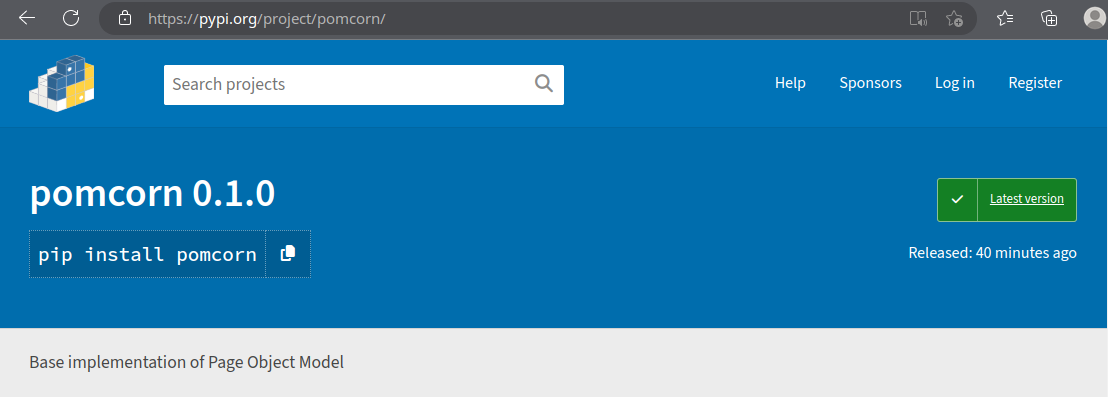
Package details page

PackageDetailsPage

Bases: PyPIPage

Represent the package details page.

Source code in demo/pages/package_details_page.py
 9
10
11
12
13
14
15
16
17
18
19
20
21
22
23
24
25
26
27
28
29
30
31
32
33
34
class PackageDetailsPage(PyPIPage):
    """Represent the package details page."""

    @property
    def header(self) -> str:
        """Get the header text."""
        return self.init_element(
            locator=locators.ClassLocator("package-header__name"),
        ).get_text()

    @classmethod
    def open(  # type: ignore
        cls,
        webdriver: WebDriver,
        package_name: str,
        *,
        app_root: str | None = None,
    ) -> PackageDetailsPage:
        """Search and open the package details page by its name."""
        from demo.pages import IndexPage

        search_page = IndexPage.open(
            webdriver,
            app_root=app_root,
        ).search.find(package_name)
        return search_page.results.get_item_by_text(package_name).open()

header property

Get the header text.

open(webdriver, package_name, *, app_root=None) classmethod

Search and open the package details page by its name.

Source code in demo/pages/package_details_page.py
19
20
21
22
23
24
25
26
27
28
29
30
31
32
33
34
@classmethod
def open(  # type: ignore
    cls,
    webdriver: WebDriver,
    package_name: str,
    *,
    app_root: str | None = None,
) -> PackageDetailsPage:
    """Search and open the package details page by its name."""
    from demo.pages import IndexPage

    search_page = IndexPage.open(
        webdriver,
        app_root=app_root,
    ).search.find(package_name)
    return search_page.results.get_item_by_text(package_name).open()

Note

You don't have to implement the check_page_is_loaded page method if this property is set on the base page and is appropriate for the current page.

Tests

This folder contains autotests that use pages prepared in fixtures to reproduce some scenarios of user interaction with the site.

Check that click on site logo redirect to index page.

Source code in demo/tests/test_logo.py
 4
 5
 6
 7
 8
 9
10
def test_logo(help_page: HelpPage):
    """Check that click on site logo redirect to index page."""
    old_url = help_page.current_url
    index_page = help_page.click_on_logo()
    index_page.wait_until_url_changes(old_url)

    assert help_page.current_url.endswith("pypi.org/")

Conftest

Here are the implemented base fixtures for implemented PyPI pages. This is useful practice to avoid duplicating page opening calls in each test. Also, the webdriver fixture with a given window size (1920×1080) is implemented here.

help_page(webdriver)

Open help page of PyPI and return instance of it.

Source code in demo/conftest.py
30
31
32
33
@pytest.fixture
def help_page(webdriver: WebDriver) -> HelpPage:
    """Open help page of PyPI and return instance of it."""
    return HelpPage.open(webdriver)

index_page(webdriver)

Open index page of PyPI and return instance of it.

Source code in demo/conftest.py
24
25
26
27
@pytest.fixture
def index_page(webdriver: WebDriver) -> IndexPage:
    """Open index page of PyPI and return instance of it."""
    return IndexPage.open(webdriver)

results_page(webdriver)

Open search results page of PyPI and return instance of it.

Source code in demo/conftest.py
36
37
38
39
@pytest.fixture
def results_page(webdriver: WebDriver) -> SearchPage:
    """Open search results page of PyPI and return instance of it."""
    return SearchPage.open(webdriver)

webdriver()

Initialize Chrome webdriver.

Source code in demo/conftest.py
10
11
12
13
14
15
16
17
18
19
20
21
@pytest.fixture(scope="session")
def webdriver() -> WebDriver:
    """Initialize `Chrome` webdriver."""
    options = selenium_webdriver.ChromeOptions()

    # Set browser's language to English
    prefs = {"intl.accept_languages": "en,en_U"}
    options.add_experimental_option("prefs", prefs)

    webdriver = selenium_webdriver.Chrome(options)
    webdriver.set_window_size(1920, 1080)
    return webdriver